HTML5 Tutorial For Beginners - part 1 of 6

Monday, June 8, 2015

This series of videos demonstrates how to write HTML code that is compliant with the new HTML5 standards. These videos are good for beginners.

Part 1: This video describes HTML tags, elements, and attributes. The new HTML5 doctype declaration is shown as well as the method for specifying the character encoding for the document. The basic structure of an HTML document is also shown. This video introduces the html, head, meta, title, body, and p tags.

Part 2: This video describes how to use text. The p tag is demonstrated and the heading tags are introduced. The br tag is also shown. This video also touches on the importance of CSS. A quick demonstration of CSS is shown to center some text and to change its color. In older versions of HTML, text could be centered by using the align attribute. However, this attribute is deprecated and is not valid HTML5. While the align attribute may still work in your browser, it is not compliant with HTML5 standards. Therefore, learning CSS can be very beneficial when working with HTML5 code. 

Part 3: This video demonstrates how to use images and hyperlinks. The difference between relative and absolute addressing is covered. This video shows the height and width attributes used with the img tag. In older versions of HTML, the height and width attributes could be specified in pixels or as a percentage. However, it is not valid HTML5 to specify these values as a percentage. If a percentage value is desired then CSS can be used.

Part 4: This video introduces 2 elements that are new to HTML5, the audio and video elements. While older browsers don't support these new elements, the popular newer browsers do.

PART 1

WATCH VIDEO

PART 2

WATCH VIDEO

PART 3

WATCH VIDEO

PART 4

WATCH VIDEO

PART 5

WATCH VIDEO

PART 6 

WATCH VIDEO

HTML Tutorial for Beginners - part 1 of 4


How to make a website: HTML Tutorial - Basics. Start off with a solid foundation by learning some of the basics of HTML - XHTML. In this HTML tutorial you will learn how to make a simple webpage. 

The tutorial starts off with definitions for both HTML and XHTML. It then goes on to demonstrate how you can use Microsoft Notepad to create your HTML file. It explains what HTML tags are and how to use some of the basic ones. This tutorial also shows how to display the HTML file in a web browser.

This tutorial is based on XHTML version 1.0.

PART 1

WATCH .VIDEO

PART 2

WATCH .VIDEO

PART 3

WATCH .VIDEO

PART 4

WATCH VIDEO

What is HTML?

Saturday, June 6, 2015

HTML is a markup language for describing web documents (web pages).
  • HTML stands for Hyper Text Markup Language
  • A markup language is a set of markup tags
  • HTML documents are described by HTML tags
  • Each HTML tag describes different document content

HTML Example

A small HTML document:

<!DOCTYPE html>
<html>
<head>
<title>Page Title</title>
</head>
<body>

<h1>My First Heading</h1>
<p>My first paragraph.</p>

</body>
</html>

Try it Yourself »

Example Explained

  • The DOCTYPE declaration defines the document type to be HTML
  • The text between <html> and </html> describes an HTML document
  • The text between <head> and </head> provides information about the document
  • The text between <title> and </title> provides a title for the document
  • The text between <body> and </body> describes the visible page content
  • The text between <h1> and </h1> describes a heading
  • The text between <p> and </p> describes a paragraph
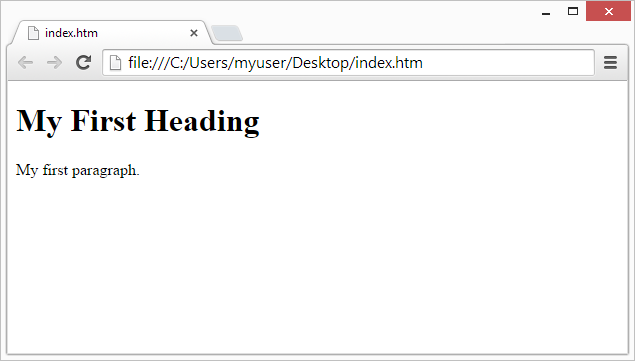
Using this description, a web browser can display a document with a heading and a paragraph.

HTML Tags

HTML tags are keywords (tag names) surrounded by angle brackets:
<tagname>content</tagname>
  • HTML tags normally come in pairs like <p> and </p>
  • The first tag in a pair is the start tag, the second tag is the end tag
  • The end tag is written like the start tag, but with a slash before the tag name
NoteThe start tag is often called the opening tag. The end tag is often called the closing tag.

Web Browsers

The purpose of a web browser (Chrome, IE, Firefox, Safari) is to read HTML documents and display them.
The browser does not display the HTML tags, but uses them to determine how to display the document:
View in Browser

HTML Page Structure

Below is a visualization of an HTML page structure:
<html>
<head>
<title>Page title</title>
</head>
<body>
<h1>This is a heading</h1>
<p>This is a paragraph.</p>
<p>This is another paragraph.</p>
</body>
</html>
NoteOnly the <body> area (the white area) is displayed by the browser.

The <!DOCTYPE> Declaration

The <!DOCTYPE> declaration helps the browser to display a web page correctly.
There are different document types on the web.
To display a document correctly, the browser must know both type and version.
The doctype declaration is not case sensitive. All cases are acceptable:
<!DOCTYPE html>

<!DOCTYPE HTML>

<!doctype html>

<!Doctype Html>

HTML Versions

Since the early days of the web, there have been many versions of HTML:
VersionYear
HTML1991
HTML 2.01995
HTML 3.21997
HTML 4.011999
XHTML2000
HTML52014